Deep Q-Network (DQN)
论文链接: https://www.nature.com/articles/nature14236。
深度 Q 网络(Deep Q-Network,DQN)是深度强化学习(DRL)中一种奠基性的无模型算法,它将经典的强化学习方法 Q-learning 与深度神经网络相结合。
该算法最早由 DeepMind 团队于 2015 年提出,并在直接以像素图像作为输入的 Atari 游戏任务中取得了显著成功,在许多游戏中的表现甚至超过了人类玩家。
下表列出了 DQN 算法的一些基本特征:
DQN 的特征 |
是否具备 |
说明 |
|---|---|---|
On-policy(同策略) |
❌ |
行为策略与目标策略相同。 |
Off-policy(异策略) |
✅ |
行为策略与目标策略不同。 |
Model-free(无模型) |
✅ |
不需要预先构建环境动力学模型。 |
Model-based(基于模型) |
❌ |
需要利用环境模型训练策略。 |
离散动作 |
✅ |
可以处理离散动作空间。 |
连续动作 |
❌ |
不适用于连续动作空间。 |
Q-Learning
Q-Learning 是一种无模型强化学习算法。在该算法中,智能体学习动作价值函数 \(Q(s,a)\),用于估计智能体在状态 \(s\) 下执行动作 \(a\),并在此后遵循最优策略时所能获得的期望累计回报。
Q 值通过 Bellman 方程进行更新:
其中,\(\alpha\) 为学习率,\(r\) 为奖励,\(\gamma\) 为折扣因子,\(s'\) 为下一状态。
深度 Q 网络
DQN 不再像表格型 Q-learning那样使用表格存储 Q 值,而是使用深度神经网络近似 Q 函数,因此能够处理图像等高维状态空间。

经验回放缓冲区用于存储智能体的交互经验 \(<s,a,r,s'>\)。训练时,从缓冲区中随机采样小批量经验数据更新网络。
这种方法能够降低连续样本之间的相关性,并提高训练过程的稳定性。
DQN 还使用一个独立的目标网络计算训练过程中的目标 Q 值。
目标网络以固定周期进行更新,从而减小训练中的振荡和不稳定现象。
网络使用预测 Q 值与目标 Q 值之间的均方误差(MSE)作为损失函数:
其中,\(y = r + \gamma \max_{a'}{Q(s', a'; \theta^{-})}\),\(\theta^{-}\) 表示目标网络的参数。
DQN 使用 \(\epsilon\)-greedy 策略进行动作选择:以概率 \(\epsilon\) 随机探索动作,其余情况下利用当前已经学习到的策略:
DQN 的主要优点包括:
能够处理图像等高维输入空间。
通过经验回放和目标网络等技术提高 Q-learning 的训练稳定性。
在多个 Atari 游戏中展现出了超越人类玩家的能力。
算法
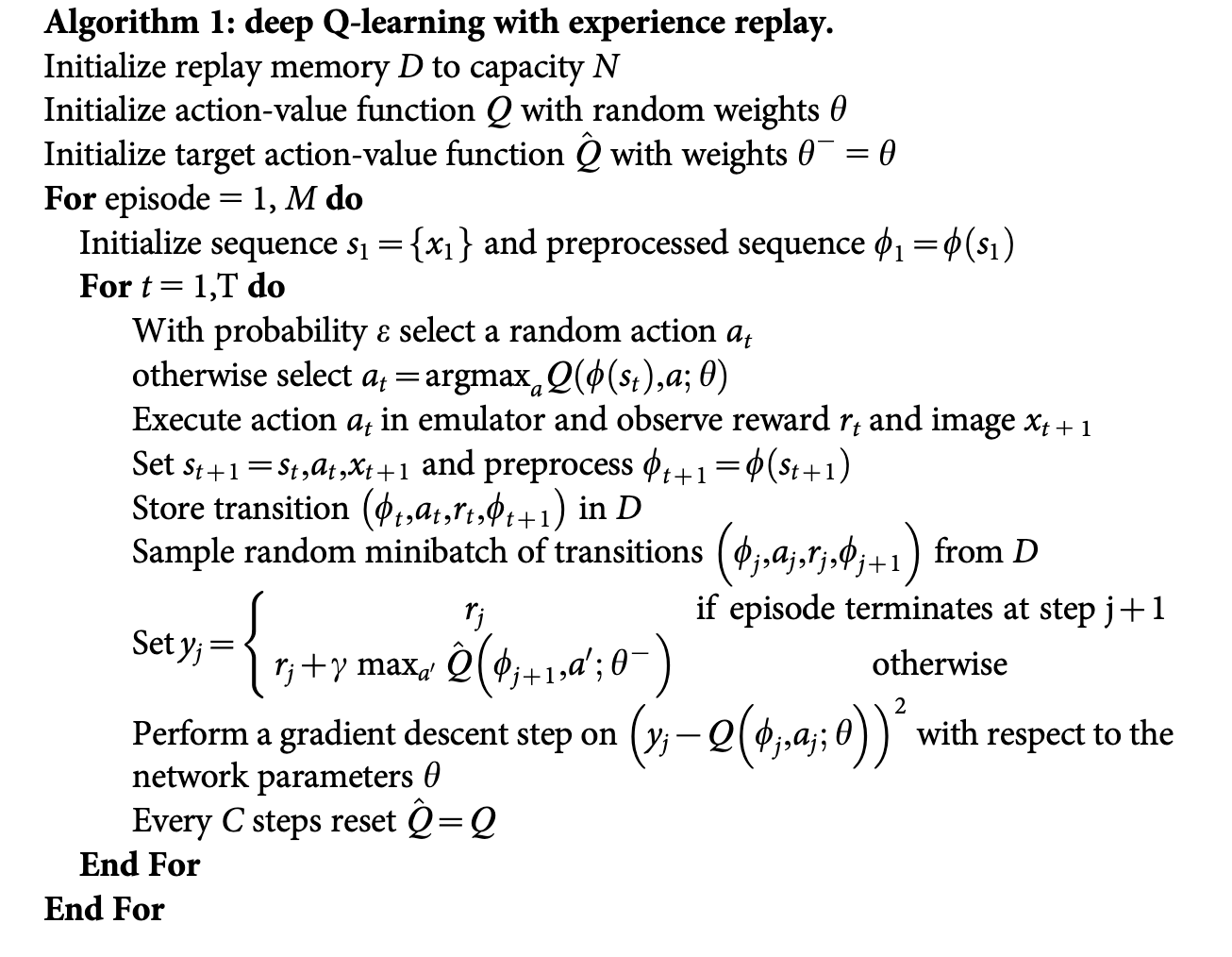
DQN 的完整训练算法如算法 1 所示:
框架
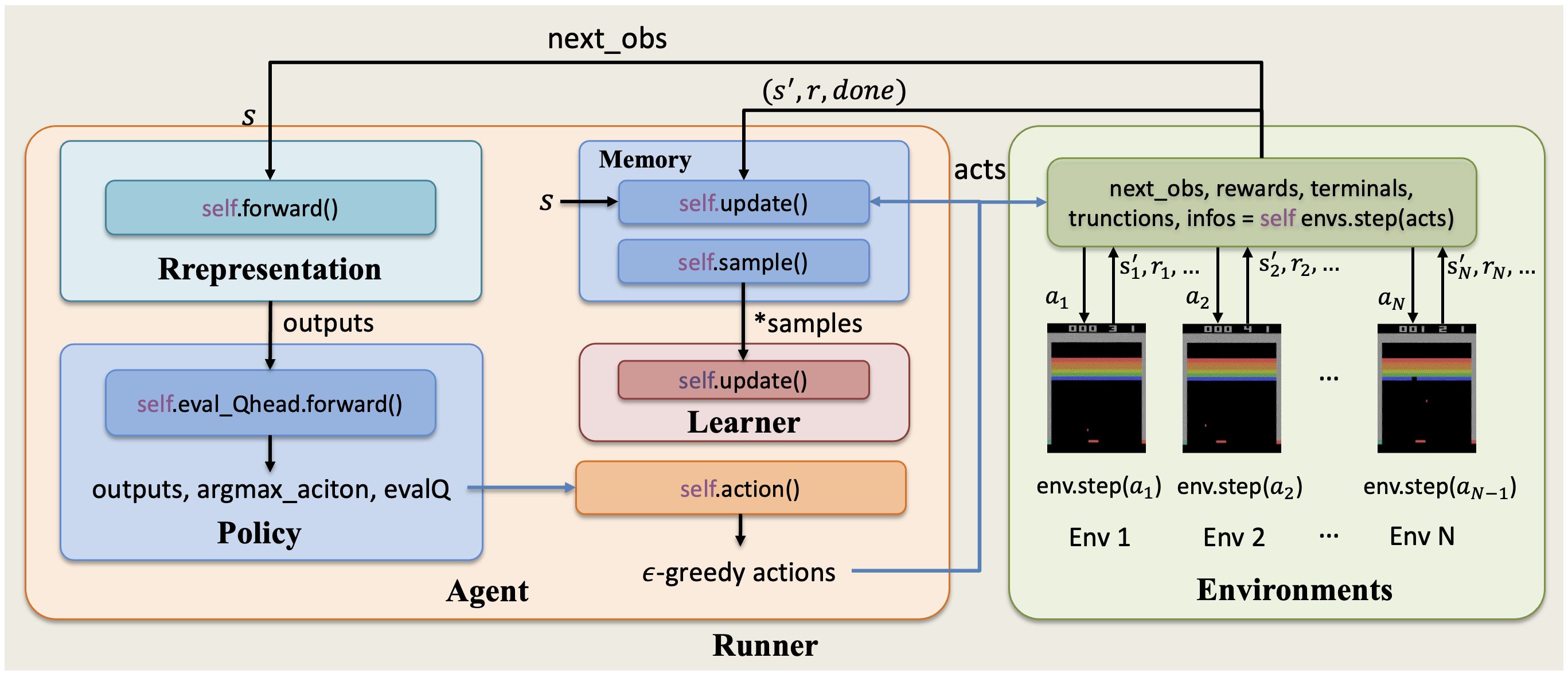
XuanCe 中实现的 DQN 智能体与环境之间的整体交互流程如下图所示。
在 XuanCe 中运行 DQN
在 XuanCe 中运行 DQN 之前,需要先准备 Conda 环境,并按照安装步骤安装 xuance。
运行内置示例
完成安装后,可以打开 Python 控制台,并使用以下命令直接运行 DQN:
import xuance
runner = xuance.get_runner(algo='dqn',
                           env='classic_control',  # 可选:classic_control、box2d、atari。
                           env_id='CartPole-v1',  # 可选:CartPole-v1、LunarLander-v3、ALE/Breakout-v5 等。
                           )
runner.run()  # 或使用 runner.benchmark()
使用自定义配置运行
若希望使用不同的配置运行 DQN,可以创建一个新的 .yaml 文件,例如 my_config.yaml。
随后,通过以下代码运行 DQN:
import xuance
runner = xuance.get_runner(algo='dqn',
                       env='classic_control',  # 可选:classic_control、box2d、atari。
                       env_id='CartPole-v1',  # 可选:CartPole-v1、LunarLander-v3、ALE/Breakout-v5 等。
                       config_path="my_config.yaml",  # 请确保 my_config.yaml 的路径正确。
                       )
runner.run()  # 或使用 runner.benchmark()
若要进一步了解配置方法,请参阅配置教程。
在自定义环境中运行
如果希望在 XuanCe 尚未内置的自定义环境中运行 DQN,需要按照新环境教程中的步骤定义新环境。
随后,准备配置文件 dqn_myenv.yaml。
完成上述步骤后,可以使用以下代码在自定义环境中运行 DQN:
import argparse
from xuance.common import load_yaml
from xuance.environment import REGISTRY_ENV
from xuance.environment import make_envs
from xuance.torch.agents import DQN_Agent

configs_dict = load_yaml(file_dir="dqn_myenv.yaml")
configs = argparse.Namespace(**configs_dict)
REGISTRY_ENV[configs.env_name] = MyNewEnv

envs = make_envs(configs)  # 创建并行环境。
Agent = DQN_Agent(config=configs, envs=envs)  # 创建 XuanCe DQN 智能体。
Agent.train(configs.running_steps // configs.parallels)  # 训练指定数量的步数。
Agent.save_model("final_train_model.pth")  # 将模型保存到 model_dir。
Agent.finish()  # 结束训练并释放相关资源。
引用
@article{mnih2015human,
  title={Human-level control through deep reinforcement learning},
  author={Mnih, Volodymyr and Kavukcuoglu, Koray and Silver, David and Rusu, Andrei A and Veness, Joel and Bellemare, Marc G and Graves, Alex and Riedmiller, Martin and Fidjeland, Andreas K and Ostrovski, Georg and others},
  journal={nature},
  volume={518},
  number={7540},
  pages={529--533},
  year={2015},
  publisher={Nature Publishing Group UK London}
}